

Introduction
In this article I will talk about developing a real time chat. You can check the chat working in this video.
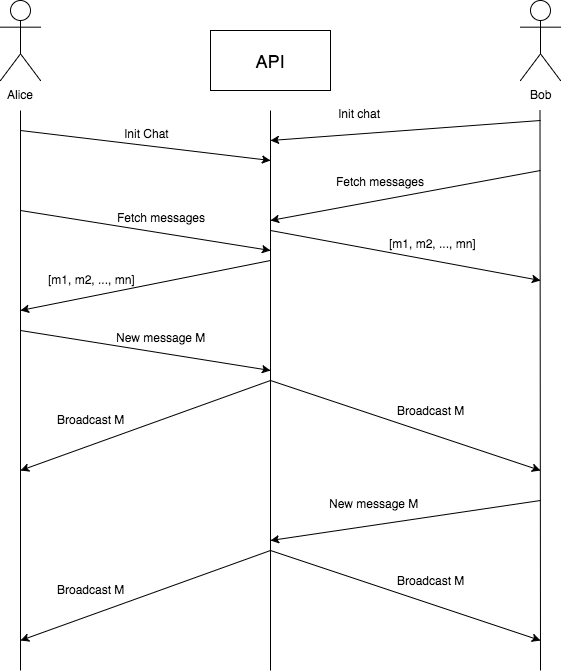
I will use Django Channels on the API side with React and Websockets on the frontend. Here is an image explaining the message flow between the API and the frontend:
Requirements
API
- python 3
- pip
- redis-server
- PostgreSQL
Frontend
- yarn
Setup
API
You can check the API code here.
Then execute the following commands to run the API:
$ brew install python$ brew install redis$ pip3 install virtualenv$ git clone https://github.com/RubenSousaDinis/real-time-chat-api$ cd real-time-chat-api$ source venv/bin/activate$ pip3 install -r requirements.txt$ redis-server & python3 manage.py runserver 0:8000Frontend
You can check the Frontend code here.
Then execute the following commands to run the Frontend:
$ brew install yarn$ git clone https://github.com/RubenSousaDinis/real-time-chat-frontend.git$ cd real-time-chat-frontend$ yarn install$ yarn startDjango API
Database ORM
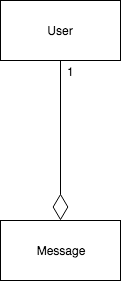
It couldn’t be any simpler than this… We just need the Message model to store the content of the message and when the message was created/received, and the User model to know the author of the message.
Channels Setup
We need to add channels to the application installed apps.
And to point to our redis server location.
Redis is an in-memory key-value database. Redis has many use cases, but here we will use it to implement the publish subscribe pattern. You can learn more about Redis in this post.
Then we just need to define the channels routing:
We are pointing all web socket requests with path ws/path to our consumer ChatConsumer:
This is just a short view of our ChatConsumer, you can check the full version here.
The connect function will be called when a web socket client attempts to connect with our API. As we only have one chat, we connect every request to the same channel, the chat_room. After that, the client and the API can interact.
When the client sends a message to the channel, the receive method gets called. In this implementation I’m always assuming that the client sends a command field so I can know what operation should be invoked. Currently there are only 3 operations:
- init_chat
- fetch_messages
- new_message
After the connection is established the client and the API will stay connected until someone breaks that connection. When the connection dies the disconnect method is invoked.
React Client
This is our entry point for the frontend. The App.js file contains the main logic of our react client. You can see the complete file here.
The user must insert a username in order to enter the chat room. There is no login, it only requires a username. After that, the user will be guided to the chat room where he can start chatting with other users.
When the user submits the form we will connect the web socket to the Django API and send the username through the open channel.
The function connect adds the callbacks that will be triggered when the web socket opens, receives a message, gets an error and closes.
When the client web socket is closed it will try to connect again.
When a new message is sent through the channel the socketNewMessage function will be called:
I’m only waiting to receive two different commands. The messages command, that contains the last 50 messages of the chat and the new_message command, that will contain a message sent by another user, or by the own user.
If the command matches one of the above it will trigger a callback that was previously added in the Chat.js component:
Both functions will be called for the respective command, setMessages will add the 50 messages to the component state and addMessage will add the received message to the state. You can check the complete file here.
I’ve implemented it this way to keep it simple. Another possible solution can be implemented using Redux, mapping the commands above to actions that will be received by the store which will be responsible for changing the state of the app.
Future Work
If you’re interested in exploring this further, try your hand at implementing some of the following features based on the example app provided:
- Login feature using the User model
- Use HTTP to login and fetch messages
- Show online users
- Private conversations between users
I hope this tutorial was helpful for you. I welcome your comments on this, and would like to know how you’re doing with Django Channels and Websockets.
I’m a web developer at Runtime Revolution, I like to be challenged everyday, learn new stuff and feel that I’m valuable to the company and to our clients.