

Imagine being in charge of setting up the infrastructure to deploy an application for the first time. You will need to create a number of resources, each one with its own set of configurations.
In the real world, having an app deployed in multiple environments is common, which means setting up the infrastructure multiple times, all with at least very similar configurations.
Instead of doing all this manually, define the infrastructure through code and, when a new environment is needed, run that code to deploy automatically. Terraform, a tool developed by HashiCorp, can solve this problem.
While different applications will have their own infrastructure needs, one way to handle this is to identify what is common between them and create a configurable template using Terraform. This can be included in the application. The specific needed configurations can be defined through a variables file. Then, by running the application, we would have our infrastructure.
This is not a unique solution proposal. This project was born based on expanding on one existing solution: Terra3, which offers a template for creating a three-tier architecture in Amazon Web Services (AWS) using Terraform. The reasons for trying to expand on it were for more flexibility on the infrastructure setup for the template. This lends itself to being useful for more than a single project. Additionally, and more importantly, due to projects hosted in different clouds, it helps to have equivalent templates for other providers besides AWS. The basic roadmap for this project was to implement a template for AWS first and then two other cloud providers: Azure and Google Cloud.
Note: This project was developed using Terraform when it was an open-source tool. For future development, OpenTofu is another option, a new tool built on a fork of the last open-source version of Terraform.
The Solution
Architecture
The goal is to implement a flexible template named Nimbus for a three-tier architecture. An overview of the architecture we want to implement can be represented as follows:
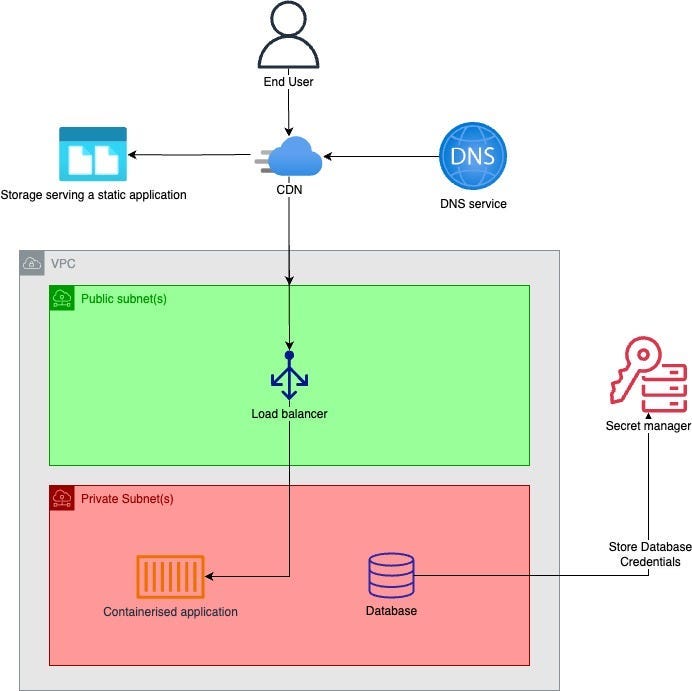
For further details on how this implementation works, we’ll focus on the AWS cloud provider.
AWS Template Implementation
The complete infrastructure deployed by Nimbus is as follows:
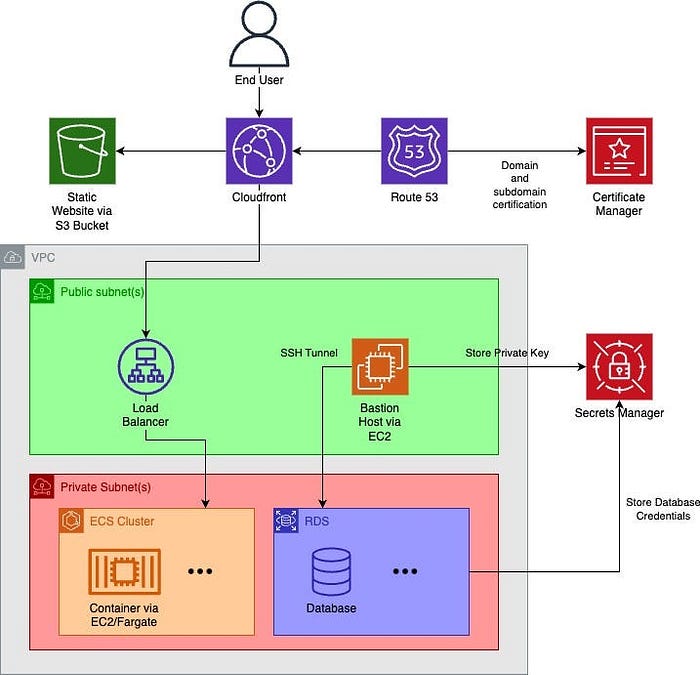
We will now break down this architecture and describe at a high level what features each offers. To check the code and instructions on how to use it, please check the GitHub repository of the AWS Nimbus project.
Virtual Network Containing Public and Private Subnets
A virtual private cloud (VPC) is at the base of the architecture. It contains a customizable number of private and public networks (which must be greater than zero). The resources created in each of these subnets depend on the configuration given to the template. They will be described along with the relevant resources to them. To enable resources inside the private subnet, network address translation (NAT) gateways are created in the public subnets and mapped to the private subnets.
DNS via Route 53
If we have a custom domain for the project we are deploying, we can set up a Domain Name System (DNS) using Route53. Besides setting up a DNS, the domain will also create the necessary AWS Certificate Manager (ACM) certificates for the domain and respective subdomains.
However, the current solution contains a limitation. While setting up Route53, it is necessary to configure the zone nameservers on the domain side after setting up the zone, so the ACM certificate can be validated. The validation will be pending this action, meaning that if the namespace configuration takes too long, the process will end with an error due to timeout (the default value is 75 minutes). This is a limitation because the namespace validation on the domain provider side can take too long and trigger a timeout error. In this case, start the process again — it will resume because the previous steps were not affected.
Content Hosting
This template offers two ways of hosting an application. Their usage is configurable, meaning it can be used simultaneously.
Static Website Hosted in a S3 Bucket
If enabled, an S3 bucket will be created, from where we can serve a static website. This bucket will be outside of the architecture VPC and it is protected from external accesses, meaning that it can only be accessed through a content delivery network (CDN), this will be explained later). In the future, it would be more convenient to allow the use of external hosts instead of forcing the creation using an S3 bucket.
Containerized Application Running on ECS
An Entity Component System (ECS) creates a cluster and, inside of it, a service for each container. For each service, we can configure what image to use, how powerful it will be resource-wise, the port at which it will be accessible, and the number of instances.
These services will be deployed in the private subnet, meaning that they will not be exposed to external clients. Instead, a public load balancer will be deployed inside the public subnet, which will serve as the point of contact for these containerized applications.
CDN Serving the Static Website and/or the Containerized Application
In the previous section, we explained the two ways of hosting applications in the architecture. We now explain how we serve them using a CDN.
In this resource, we want to focus on its origins, whose configuration will define how our applications are served. Here, we will have one origin for each application entry point:
- If we have a static website in an S3 bucket, our CDN receives the S3 bucket URL, which serves as the origin domain name. Additionally, the name of the document that serves as the entry point of the static application is needed. However, there is already a resource for a S3 origin configuration, so no additional configuration is needed.
- If we have a containerized application, the origin domain name will be the load balancer for the application. For this application, our CDN also expects which path patterns to expect (for example, if the application paths always start with “/api/” the path pattern to pass to the CDN should be “/api/*”). Finally, unlike the S3 origin, here we need to pass additional parameters to configure the origin, namely the HTTP and HTTPS ports, the protocol policies, and SSL protocols.
If we have a custom domain, an alias for the CDN is created in Route53.
Relational Database Instances via RDS
The template allows the deployment of multiple relational databases with different configurations (including the engine, which is the only mandatory parameter to provide while configuring the infrastructure).
These databases are created inside the private networks. To provide a way to access them from an external source, we can enable the creation of a bastion host. This creates an Amazon Elastic Compute Cloud (EC2) instance available in the public subnets that allows connecting to the databases through an SSL tunnel. If enabled, we need to specify its Amazon Machine Image (AMI), this is mandatory, and its instance type, this is not mandatory.
Conclusion
Looking at the mission as specified earlier, we can summarize Nimbus as an exercise for creating a template for multiple projects. The biggest challenge here is its flexibility. We need to find the sweet spot between allowing users to configure it and allowing its use in multiple projects, but it should not be cumbersome.
Because AWS was tested using very simple applications, the next step is trying to use Nimbus to deploy a more complex project and verify its usefulness in the real world. For instance, we identified two implementation alternatives that could be interesting to explore in the future:
- Moving the bastion host to the private subnet increases the control over who can access the databases through SSL.
- Allowing the use of other storage alternatives to host static websites instead of using an S3 bucket.
Regarding implementing the architecture for multiple providers, our initial goal was to include all implementations for each provider in a single project — using the provider as a variable. Unfortunately, Terraform does not support dynamic providers (unless we are willing to install all providers when applying the template just to use one of them, which is redundant), meaning that for each architecture, we must have a separate project. Besides the implementation for the AWS we described here, we also have a mostly complete implementation for Azure, whose current status is as follows:
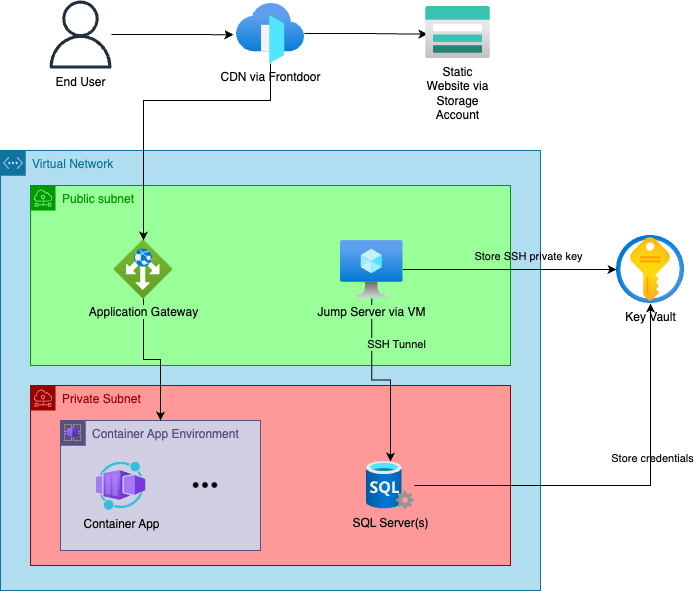
For more details and to track the project progress, check the GitHub repository of the Azure Nimbus project.