

This article compares how Django Ninja (Ninja) and Django Rest Framework (DRF) are implemented in a Django project, highlighting the differences between schemas and serializers, filters, views, and URLs.
It does not focus on performance benchmarks.
For this purpose, we create an API to perform CRUD operations on a Category model. This will not implement authentication or authorization.
Packages
At the time of writing this article, Django 5.0.6 is used along with the following libraries:
For DRF:
- djangorestframework 3.15.2
- django-filter 24.2 (used as an alternative for default DRF filters)
- drf-spectacular 0.27.2 (used for Swagger)
For Ninja:
- django-ninja 1.2.0
- django-ninja-crud 0.5.0 (optional)
In Ninja’s case, there aren’t external libraries specific to Swagger and filters because those are built-in.
Project structure
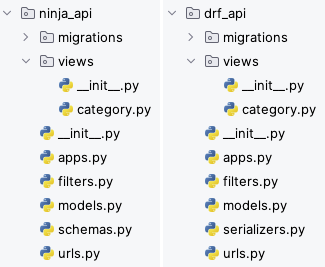
The following image shows the difference between the Django app structure for Ninja and DRF. The only difference is between the files schemas.py and serializers.py.
Model
The code below presents the Category data model used in Ninja and DRF.
Schemas and Serializers
It is important to note that Ninja uses Pydantic to validate data, unlike DRF, which uses its own types.
Field Validation example
The following code shows how to conduct value validation in both libraries. In this example, there is a value field — that must be greater than zero.
Filters
In this API, a filter is implemented to allow categories to be searched by name.
One of Ninja’s advantages in filtering is that it allows the usage of the same filter in other models that have the name field. DRF allows something similar but in a more verbose way since it’s inherited from the generic class with the name filter and then defines the Meta class, as shown in the next example.
Views
As shown below, while DRF abstracts the programmer from all the login inherent in each API HTTP method, Ninja requires all the logic to be written. However, as shown in the second code snippet, using the django-ninja-crud (Ninja CRUD) library greatly reduces the need for code, bringing Ninja closer to the abstraction offered by DRF.
Here is the same implementation as above but using the django-ninja-crud library:
Although the API logic has been largely abstracted, django-ninja-crud introduces some problems.
Ninja CRUD introduces an HTTP body, by default, to every HTTP-related method. Hence, in the code example above, we can verify the declaration and the use of the remove_swagger_request_body variable in some API methods. This is done to remove the body field from Swagger, as the GET and DELETE methods do not expect any HTTP body.
For HTTP verbs that do require an ID, such as a URL parameter, the Ninja CRUD returns a status error of 500 (Internal Server Error), by default, which is not correct. To properly return the correct status, 404 (Not Found), the get_model had to be overridden.
In both previous examples, we can see the use of the different category schemas declared previously. The CategorySchema is used for responses showing all data from that model. However in POST and PUT methods, we do not want to pass the category ID in the JSON request, so for those methods, we use the CategoryCreateSchema that removes the ID field. Similarly, in PATCH, we only want to send some category fields. To do so, we use the CategoryPartialUpdateSchema, in which the ID field is also removed, and all the other fields are set as optional, to avoid Ninja validation errors in this request.
The code below shows the DRF view code:
URLs
Ninja already has Swagger integrated, so unlike in DRF, it is not necessary to set any URL path to define it.
Final remarks
Django Ninja
Advantages:
- It’s simpler, which makes it better for beginners because it also forces the programmer to understand the logic behind how an API works
- Explicit API methods using decorators
- Async support
- Better and simpler integration with Swagger
Disadvantages:
- Verbose in general and specific implementation cases
- Small nuances and details can be cumbersome (i.e.: optional field definition)
- Ninja CRUD makes development easier but introduces problems
- Requires the declaration of several schemas if the API has several HTTP methods, which can be difficult to manage in bigger projects
- Poor integration with Django ORM
- Little documentation online compared to DRF
Django Rest Framework
Advantages:
- Makes excellent use of declarative programming
- Less verbose for general implementation cases
- Fast implementation
- Excellent integration with Django ORM
- Extensive documentation online
Disadvantages:
- Verbose in specific implementation cases
- Requires a good understanding of how the library works, especially when implementing specific cases
- Need to install other libraries to complement functionalities compared to Ninja (e.g.: django-filter, drf-spectacular)
What has been mentioned here largely represents a personal opinion after using and comparing both libraries. However, the choice must always fall on the programmer or team’s personal preferences, experience level with the chosen library, and the best adaptation to project requirements.