

In this article, I’ll tell you what you need to bootstrap a React Native app.
So what is React Native?
React Native combines the best parts of native development with React, a best-in-class JavaScript library for building user interfaces. (…)
* from React Native
React Native allows you to create Android and iOS applications with the same code base, that behave nearly the same using all the resources of React with a little tweak.
Setting Up Your Development Environment
The installation process that is described on the React Native site is well documented and easy to follow, but here is the short version. I use a MacBook Pro as my development machine so the commands will be for macOS.
Installation process
- Install Xcode and Android Studio
- Install node and watchman
3. Install Java SDK
4. Install Xcode command line tools
Open Xcode, then choose the Preferences… menu.
Go to Locations panel and install the tools by selecting the most recent version in the Command Line Tools dropdown.
5. Install CocoaPods
6. Install react-native-debugger
And you are ready to go.
Now what you need to do is bootstrap your application.
React Native has a built-in command line interface, which you can use to generate a new project. You can access it without installing anything globally using npx, which ships with Node.js. (…)
* from React Native
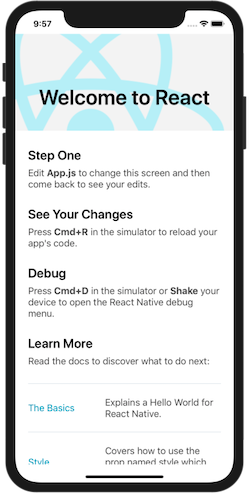
After you create your app you can choose to run the app on iOS or Android.
To open the app on iOS just run this command, it will open the iOS simulator and install the app.
To open the app on Android you will need to create a virtual device on Android Studio, open the virtual device and run the following command.
And there you go, the app is running!
Debugging
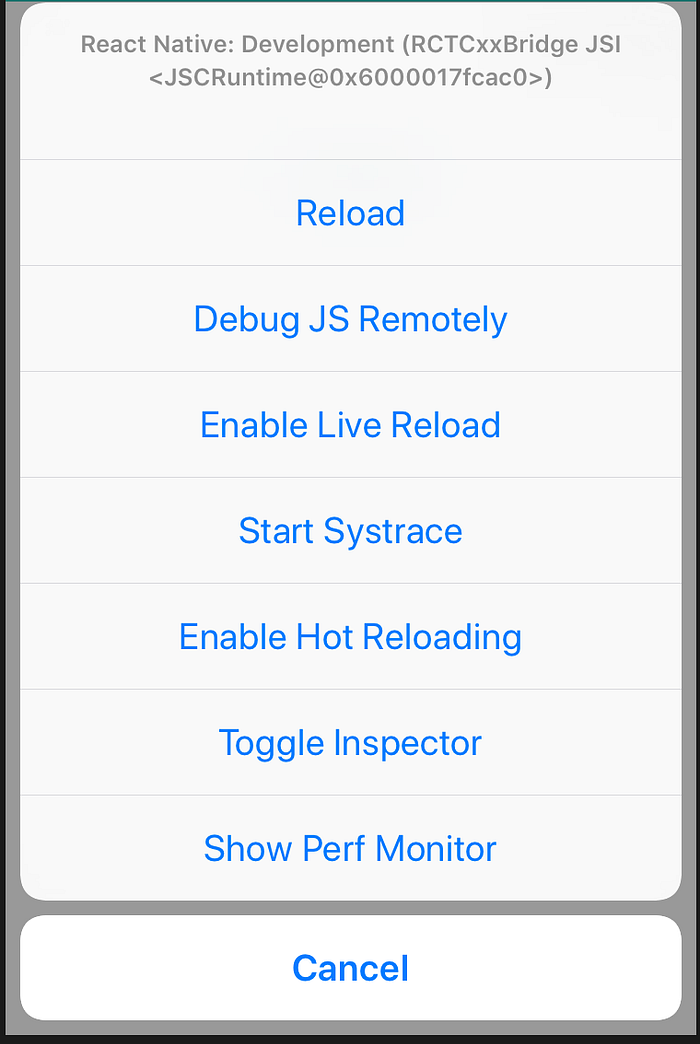
To use react-native-debugger you need to enable remote JS debugging on the simulator option:
- On iOS press CMD + D and click on Debug JS Remotely.
- On Android press CMD + P .
A nice feature of React Native is Hot Reloading, which allows you to see the code changes in real time without having to restart the app.
To enable this option, open the simulator options and click on Enable Hot Reloading.
At this point you have your React Native environment set and ready to start coding some apps.
Recommended links
anunes9 — OverviewDeveloper at Runtime Revolution, Portugal, IT Graduated at FCUL, Portugal Block or Report Jul Aug Sep Oct Nov Dec Jan…github.comI’m a software developer from Portugal, currently working at Runtime Revolution as a front-end and mobile developer.
Runtime RevolutionWorking for a US company from Lisbon as an offshore team In February of 2016, I started a new experience in my life. I…runtime-revolution.com