

Quick Overview: Lighthouse Open-Source Tool
Ever wondered how to make your website faster, more accessible, and SEO-friendly with just a few clicks? Meet Lighthouse, Google’s all-in-one audit tool!
TL;DR:
Lighthouse is a powerful, open-source tool from Google that audits your website performance, accessibility, SEO, and adherence to best practices. It’s user-friendly, integrates with Chrome DevTools, and provides actionable insights to improve your site. Ideal for web developers, designers, QA teams, marketers, and project managers. When used correctly, it can significantly impact your website’s ranking and user experience.
First Impressions:
Upon launching Lighthouse, I was immediately impressed by the simplicity of the user interface. All you need to do is select what you want to audit and press start — Lighthouse takes care of the rest! It presented several options to enhance SEO, performance, and accessibility that could be implemented in a short amount of time. I was impressed. I still am.
Installation/Setup:
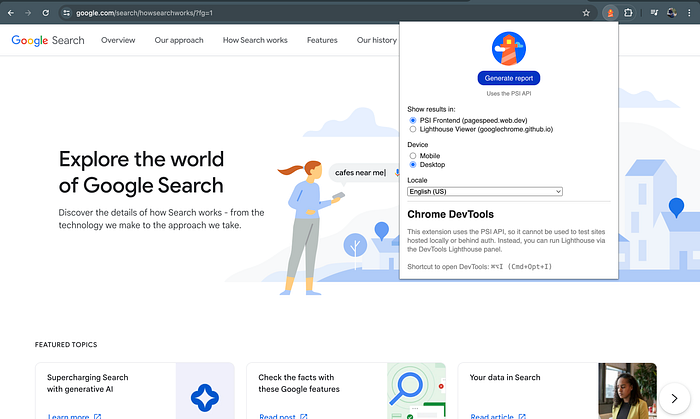
A simple extension can be added to Chrome, Firefox, and other major browsers with just a few clicks, without any complex configurations or technical jargon — just simplicity. Plus, it integrates seamlessly with DevTools, making it easy to use, even for those not technically sound, directly in the browser.
User Interface:
Clean, organized, and user-friendly are the three words that best describe Lighthouse. The tool guides you through each performance category, making it accessible even for those less familiar with web optimization. It provides a comprehensive overview of various aspects of website performance, including SEO score, image loading speed, and even insufficient color contrast. Detailed descriptions and images show you what’s wrong and explain how to fix it. Some of the advanced stuff might still need a bit of Googling, though.
For example, minimizing main-thread work can be more complex. The report might suggest potential savings in JavaScript execution time or ask you to reduce unused JavaScript. Addressing these issues often requires diving into JavaScript profiling and optimization techniques.
Another advanced recommendation could involve serving static assets more efficiently. Integrating a Content Delivery Network (CDN) is one such solution that can improve asset delivery and caching. These strategies might go beyond basic web optimization and require some additional technical knowledge.
Report Options:
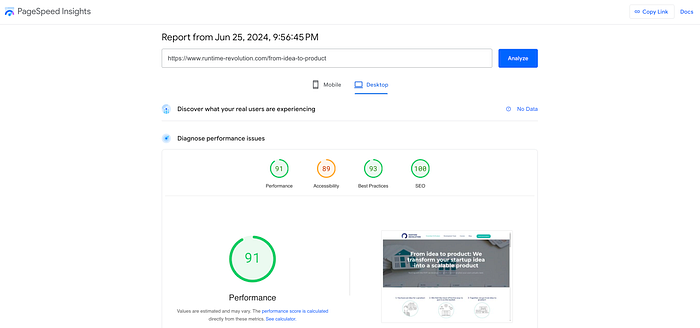
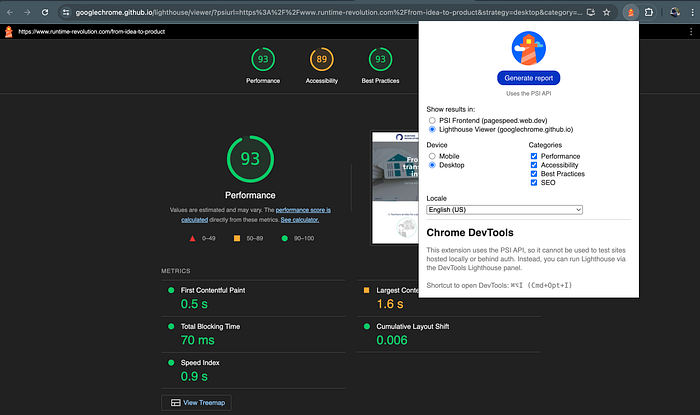
Now, you can choose between two types of reports — one that sends you to PageSpeed and handles the job there, or one that uses the Lighthouse viewer (default option through the DevTools). We will not go into detail for either of them, but it’s important to note that they are different, and if used together you will probably enhance your results.
Key Features:
Lighthouse is packed with powerful features to optimize your website. Here are some of the key features that stand out:
- Performance audits: Measures your website’s load time, interactivity, and stability. It highlights opportunities to speed up your site and improve the user experience.
- Accessibility audits: Ensures your website is accessible to all users, including those with disabilities. It identifies issues like insufficient color contrast, missing alt text, and keyboard navigation problems.
- Best practices: Evaluates your site against web development best practices, checking for issues like dev logs in the browser console, correct image aspect ratios, and security vulnerabilities.
- SEO audits: Provides insights into how well your site is optimized for search engines. It checks for common SEO issues such as missing meta descriptions and improper use of header tags.
- Progressive Web App (PWA) check: Assesses your site’s performance as a Progressive Web App, to ensure it provides a native app-like experience to users.
- Customizable audits: Allows you to customize the audit to focus on specific areas of your site, whether it’s performance, accessibility, SEO, or best practices.
- Detailed reports: Generates comprehensive reports with actionable recommendations and clear explanations of each issue, making it easy to understand and fix problems.
- Integration with DevTools: Seamlessly integrates with Chrome DevTools, providing a familiar and convenient environment for developers to conduct audits.
Pros and Cons:
Pros:
- Comprehensive audits: Covers performance, accessibility, SEO, and best practices in one tool.
- User-friendly: Easy-to-navigate interface, even for non-technical users.
- Detailed reports: Provides clear, actionable insights to improve your website.
- Free and open-source: Available at no cost and regularly updated by Google.
Cons:
- Learning curve: Some advanced features might require additional research to be fully understood.
- Browser dependency: Primarily designed for Chrome and may not offer full functionality in other browsers.
- Occasional overwhelming details: The detailed reports can sometimes be overwhelming for beginners.
Recommendations:
Lighthouse is a versatile tool that can benefit various roles in your team, including the following:
- Web developers: Use Lighthouse regularly to ensure your code meets best practices and optimize your site’s performance and SEO.
- Designers: Check accessibility to make sure your designs are inclusive and user-friendly.
- QA team: Integrate Lighthouse into your testing routine to catch performance and accessibility issues early on.
- Marketing team: Use the SEO audit to ensure your content is optimized for search engines to help improve visibility and reach.
- Project managers: Utilize Lighthouse reports to track the overall health of the website and identify areas needing improvement.
Conclusion:
I’m now running Lighthouse for every new page I build. It has become an essential part of our team’s web development toolkit. It’s not just a tool for the tech-savvy; think of it more like a guiding companion to enhance your website’s health, but most importantly to make it search engine friendly. Illuminate your web projects with Lighthouse and watch them rise above the competition! 🚀