

“Alice: Would you tell me, please, which way I ought to go from here?
The Cheshire Cat: That depends a good deal on where you want to get to.
Alice: I don’t much care where.
The Cheshire Cat: Then it doesn’t much matter which way you go.
Alice: …So long as I get somewhere.
The Cheshire Cat: Oh, you’re sure to do that, if only you walk long enough.”
― Lewis Carroll, Alice in Wonderland
Designing a product from scratch is a great challenging task and the way to run it isn’t always “long enough”. Sometimes there’s something new to add to the market, sometimes there’s not. A very common mistake is to assume that an idea is completely new. It is frequent to see it already applied (and well) by other products in the market and successfully. So, why bother creating something that is already out there? The answer to this question seems to be the differentiator factor the product has among the others. Unfortunately, that answer is not always easy to find. And when there’s no answer for all, that can dictate the end of a potential great idea whose only problem is timing. It’s not unusual to see that even then, there’s people willing to go for it anyway, spending time, effort, and — of course! - money, most of the time to get nowhere.

But what about the great new freshly-out-of-the-fridge ideas? If you have a really innovative idea, congratulations! You’re half way there to succeed. The path to figure out the value of an idea is commonly walked through a product design session. UX Designers have to dig into the very basics of the idea to understand where the product can stand out against the competition. This is where the users come in. They can make the difference between a success and a failure. But who are they and why should we focus on them?
Listen to your users
Answering the user’s needs with a great experience is the biggest lift your product can have (even if we are talking about an idea that is already on the market and successful). It’s not enough to make it usable and beautiful. It has to be meaningful to the users, producing the will to use it again and again. To do so it requires a good understanding of who they are.
- Who do you want to reach?
- What are their background and lifestyle?
- How engaged are they with your competition?
A lot of questions like these can be raised, but the most important of all is:
How will your product provide the answer to their needs?
“Discovering” your product
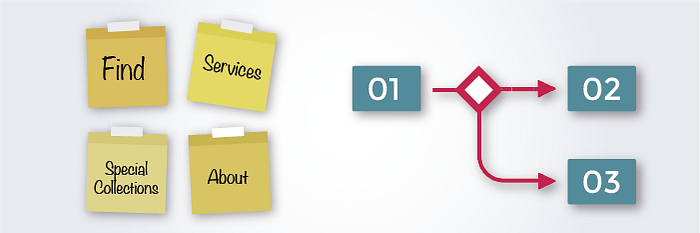
Creating personas and imagining use case scenarios are usually good strategies to “think as one of them” and figure out their needs. While doing so, you will be faced with several product requirements as well. To identify and prioritize them (using techniques such as card sorting) is a good way to start structuring your product roadmap.
- What is the first thing the users should do and how will you make them do it? How will that produce value for them?
- And after that, what should they do?
Bringing all the scenarios to the table, after you prioritize, it’s time to define the interface requirements. At this point, we already know how we want the user’s journey to be. So, let’s think about screens now…
- To do the first thing you have identified, what are the interface needs?
Going exhaustively through each and every point of the journey, can result on flowcharts, sitemaps, or even high level wireframing. The initial wireframes are actually very important to the concept elaboration process, because they give a high level perception of your product. And that can be the very first checkpoint you can use to test the concept with your potential users. Of course, there are some earlier user testings that can be performed even at the discovering stages, but testing on card sorting or even sitemaps can lead the users to a level of abstraction where their feedback won’t be as valuable.
Prototyping (and testing your prototypes)
There are several prototyping techniques to make the wireframing stage a good usability testing checkpoint. A popular one is the paper prototyping technique, which consists in drawing the interface on paper to test it with users, asking them where would they go to perform a certain task. I personally find this technique very time consuming and not as effective as the “digital” ones. There are currently tools to make quick wireframe prototypes you can use to test online or even face-to-face. The problem: sometimes it’s not easy to gather your target audience into a room for user testing. In most projects there’s absolutely no time or budget to afford it. In fact, a lot of projects turn out to jump this testing step because of that. The “people in charge” simply assume they know how the users will behave and, at the end, sometimes they become very surprised to realize the product doesn’t have much impact on the end users (… oops!). As far as you go without testing your ideas with users, you risk your product not getting the acceptance you’d like. You will have valuable clues at this point coming from the “real deal” users. Follow their lead! But do that with a good amount of feedback.
How much testing ?
How large should your “user sample” be? Studies led by Jacob Nielsen and Thomas Landauer have shown that you don’t need a huge amount of users to have a good feedback sample. In fact, to avoid having troubles with costs doing that, you can stick to 5 users, but test with them at least 3 times in the design process. In the article “A mathematical model of the finding of usability problems” they came up with a formula that clearly states that 15 users are the minimum to identify usability problems in the design, but they also suggest to do it in different project steps. You will need to see if the next designs will work better, so that’s why it’s important to re-test with the same initial 5 ones over and over until you get there. The outcome will be more valuable than test it only once with 15 users.
A good way to make user testing with low costs is to submit wireframes to online platforms such as Usability Hub. With a simple link you can send it to whoever you want and they can quickly answer it online. Of course, that person should be a potential user of your product. “Hearing” the user’s feedback on the first wireframes is a great way to make solid decisions. If it works perfectly, go ahead for the visual design! If not, go back and re-think the journey again.
Let’s get visual
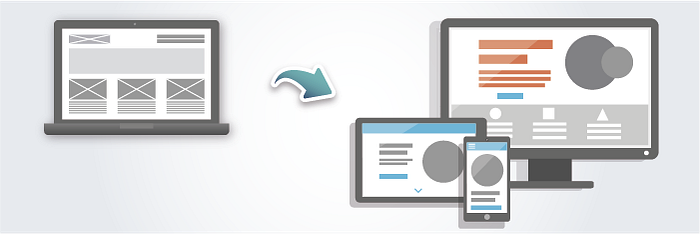
Do you have the wireframing tested, with the results you expected? Let’s go for the visuals! At this point you have the hardest part done, but user interface design is also a part of the product you will want your users to engage with. The choices regarding the interface “hot spots”, colors, components, and so on will definitely weight on the user experience. Doing beautiful interfaces, prototype them and submit for user testing should give you the clues you need to make the decision to go on to the development stage or go back and re-study the interface design outcome.
But keep testing…
While developing, your product can also be tested in each user story or sprint (if you go for the Agile development methodology) and make sure that, in real use case scenarios, the users will behave as you intended to. That will be the closest your users will be from the final product. Don’t wait to have it ready to see the results. Go on and test the skeleton, the muscles and the skin. You may think that this will be useless, but you may find out that (at the end) will be spending much less on re-doing things than you would if you have only tested with the finished product.
Happy users make successful products. So, make sure you will center your product development process on their needs and, if your idea is really valuable, you certainly will reach great results.
Like Hoa Loranger stated on the article “UX Without User Research Is Not UX”:
UX-U = X
Do you have any comments or feedback on this subject? We’d love to hear from you!
At Runtime Revolution we care about the user experience. We are a team of designers and developers willing to make your ideas a success.
Runtime RevolutionWe are Rails, mobile and product development experts. We can build your product or work with you on your project.runtime-revolution.com