

Graphics processing units (GPUs) are the backbone of AI workflows, driving computationally intensive deep learning models such as Pixel2Mesh and TripoSR. These models often place significant demands on GPU memory (VRAM), making it challenging to run multiple instances concurrently on a single-GPU. Overloading the GPU leads to resource contention, crashes, and performance degradation, issues that undermine the efficiency and stability of the entire system.
In this post, we explore how to manage GPU workloads using FastAPI and asyncio subprocesses, specifically tailored for single-GPU setups targeting a deep learning model. By running the deep learning model as isolated subprocesses, we ensure efficient video random access memory (VRAM) usage and prevent overload, enabling better task orchestration.
The Ideal Framework for GPU Workloads
FastAPI is a high-performance, asynchronous framework well-suited for orchestrating GPU workloads. Its native support for Python’s asyncio makes it an excellent choice for managing long-running tasks, such as deep learning inference, while maintaining responsiveness. The key advantages are:
- Asynchronous Architecture: Efficiently handles multiple concurrent I/O-bound tasks, preventing blocking and avoiding performance bottlenecks.
- Scalable Task Orchestration: Allows non-blocking orchestration of tasks, enabling you to manage GPU workloads dynamically and maintain application responsiveness.
- Ecosystem Integration: Seamlessly supports
asynciofor subprocess management and leverages modern Python features, simplifying development and improving maintainability.
Running Deep Learning Models as Subprocesses
Deep learning models are typically packaged as standalone scripts with specific dependencies and designed for direct execution and significant GPU demands. Running these scripts directly within a FastAPI app introduces several challenges:
- Dependency Conflicts: Models often rely on unique packages or library versions, which can clash when sharing the same Python environment.
- Inefficient GPU Usage: Running multiple models in the same process increases the risk of VRAM overcommitment and resource contention.
- Complex Refactoring: Converting standalone scripts into reusable modules demands significant restructuring, dependency management, and adapting I/O mechanisms.
Running models as separate subprocesses solves these issues by isolating each task, optimizing resource usage, ensuring fault tolerance, and enabling parallel execution.
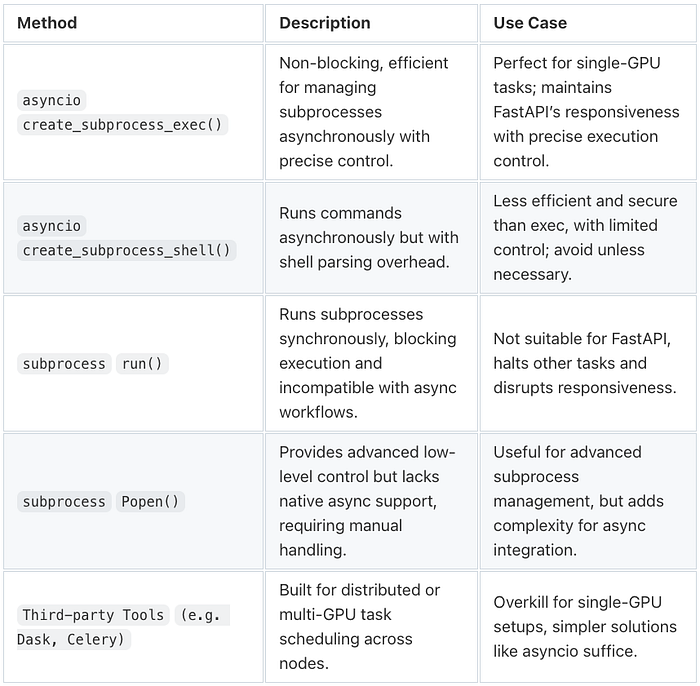
Why asyncio.create_subprocess_exec?
When running subprocesses asynchronously in an asyncio-based application, asyncio.create_subprocess_exec() is the optimal choice.
- Non-Blocking Execution: Keeps FastAPI responsiveness by enabling concurrent handling of new requests while tasks run in the background.
- Granular Control: Enables precise management of execution parameters like arguments, environment variables, and GPU-specific settings.
- Fault Isolation: Ensures that failures in one task don’t cascade into the rest of the system, simplifying debugging and recovery.
VRAM Management for Concurrent Applications
Managing GPU memory is crucial when running models on a single-GPU. Different models have varying VRAM requirements. Lightweight models may consume only a fraction of the GPU’s memory, while large models can demand significant resources for optimal performance. Allocate VRAM to ensure that resources are used efficiently to prevent over-commitment and contention.
By leveraging VRAM usage based on factors like input size and batch processing, we can allocate memory proactively. These predictions can be adjusted, accounting for varying business rules and conditions, such as image resolution or pre-processing complexity.
Example Solution
In this section, we illustrate a simple, conceptual approach for running deep learning models in a single-GPU as subprocesses using FastAPI and the asyncio library. Please note that this code is meant purely for demonstration purposes. It outlines the core ideas rather than providing a fully production-ready solution. The following solution is illustrated in the diagram below.
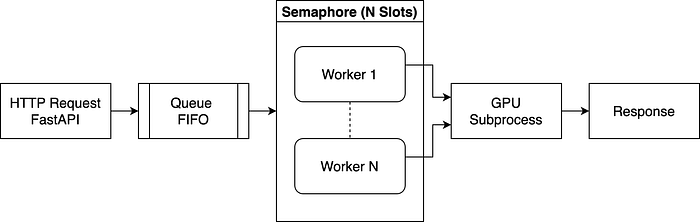
- HTTP Request → The request enters the queue instead of executing immediately.
- Queue → Jobs wait in the queue until a worker is available.
- Semaphore Limits Execution → A worker must acquire a slot before processing, ensuring controlled concurrency.
- Workers Fetch Jobs → Once a slot is free, the worker fetches the next request.
- GPU Subprocess → The worker spawns a subprocess, to execute the deep learning model, waits for completion, and releases its slot.
- Response → The result is sent back to the client asynchronously.
1. Model Setup
Before deploying a deep learning model as a FastAPI service, it is essential to first set up the model’s environment correctly. This process varies depending on the deep learning model and is typically outlined in its repository documentation, including installation steps, required dependencies, and GPU configurations.
2. Initialization of GPU Resources
Before executing deep learning models, we must analyze available GPU memory to determine the maximum number of concurrent executions without exceeding VRAM limits. For example, TriploSR requires 6GB per run, so launching too many instances risks out-of-memory errors. To prevent this, we use NVIDIA’s pynvml to monitor real-time GPU memory at startup. A VRAM_BUFFER is reserved to avoid full memory exhaustion, and the remaining VRAM dynamically determines SEMAPHORE_SLOTS, limiting execution to a safe number of concurrent runs.
import asyncio
import pynvml
from pathlib import Path

QUEUE_MAX_SIZE = 5
MODEL_EXEC_PATH = Path("/path/to/deep/learning/model/")
MODEL_VRAM_REQUIRED = 2048
VRAM_BUFFER = 1024

pynvml.nvmlInit()
GPU_HANDLE = pynvml.nvmlDeviceGetHandleByIndex(0)
MEM_INFO = pynvml.nvmlDeviceGetMemoryInfo(GPU_HANDLE)
AVAILABLE_VRAM_MB = MEM_INFO.free // (1024 ** 2)
USABLE_VRAM_MB = max(AVAILABLE_VRAM_MB - VRAM_BUFFER, 0)
SEMAPHORE_SLOTS = max(USABLE_VRAM_MB // MODEL_VRAM_REQUIRED, 1)
3. Managing Application Lifecycle
Proper startup and shutdown prevent orphaned processes and resource leaks. FastAPI’s lifespan event initializes the queue, semaphore, and workers at startup, ensuring controlled execution. On shutdown, it gracefully stops workers and cleans up resources, preventing unhandled tasks. Workers run as async coroutines (asyncio.create_task()), keeping FastAPI non-blocking and efficient.
import asyncio
from contextlib import asynccontextmanager, suppress
from fastapi import FastAPI

@asynccontextmanager
async def lifespan(app: FastAPI):
    """Initializes workers on startup and ensures clean shutdown on exit."""

    if USABLE_VRAM_MB < MODEL_VRAM_REQUIRED:
        raise RuntimeError(
            "❌ Not enough VRAM available: %d MB usable, requires %d MB."
            % (USABLE_VRAM_MB, MODEL_VRAM_REQUIRED)
        )

    semaphore = asyncio.Semaphore(SEMAPHORE_SLOTS)
    jobs_queue = asyncio.Queue(maxsize=QUEUE_MAX_SIZE)
    stop_event = asyncio.Event()

    workers = [
        asyncio.create_task(worker_main(i, jobs_queue, semaphore, stop_event))
        for i in range(SEMAPHORE_SLOTS)
    ]

    logger.info(
        "🚀 Server started with %d workers (Queue Size=%d)",
        SEMAPHORE_SLOTS, QUEUE_MAX_SIZE
    )

    app.state.jobs_queue = jobs_queue

    try:
        yield
    finally:
        logger.info("🛑 Shutting down workers...")
        stop_event.set()

        for worker in workers:
            worker.cancel()

        with suppress(asyncio.CancelledError):
            await asyncio.gather(*workers, return_exceptions=True)

        logger.info("✅ All workers stopped.")
4. Implementing the Worker System
To manage VRAM constraints efficiently, the system implements a worker-based system where requests enter a first in, first out (FIFO) queue (asyncio.Queue) and execute only when GPU resources are available. Workers process jobs in order and must acquire a semaphore slot before execution, ensuring no more models run than the GPU can handle.
The workload is I/O-bound, as workers launch GPU-intensive tasks and wait for inference results. asyncio.Queue and asyncio.Semaphore enable efficient concurrency within a single event loop, keeping FastAPI responsive and non-blocking. Unlike multiprocessing, which adds memory overhead and inter-process communication costs, asyncio allows lightweight task scheduling, maximizing throughput with minimal resource usage.
import asyncio

async def worker_main(
    worker_id: int,
    jobs_queue: asyncio.Queue,
    semaphore: asyncio.Semaphore,
    stop_event: asyncio.Event
):
    """Processes model execution requests while ensuring VRAM availability."""
    while not stop_event.is_set():
        try:
            command, future = await jobs_queue.get()
            logger.info(
                "⚡️ Worker-%d processing: %s (Queue size=%d)",
                worker_id, command, jobs_queue.qsize()
            )

            async with semaphore:
                try:
                    result = await execute_subprocess(command, MODEL_EXEC_PATH)
                    future.set_result(result)
                except Exception as e:
                    future.set_exception(e)
                    logger.error(
                        "❌ Worker-%d crashed! Shutting down application...",
                        worker_id
                    )
                    stop_event.set()
                    break
        except asyncio.CancelledError:
            break
        finally:
            jobs_queue.task_done()
5. Execute GPU Applications Asynchronously
Deep learning models can take seconds to minutes to execute, so running them synchronously would block FastAPI, preventing it from handling new requests. Instead, workers offload execution to an asynchronous subprocess, ensuring that model execution occurs in parallel without blocking API responsiveness.
import asyncio
from pathlib import Path
from typing import List


async def execute_subprocess(command: List[str], exec_path: Path):
    """Executes a command in a subprocess and returns its output."""
    process = await asyncio.create_subprocess_exec(
        *command,
        cwd=str(exec_path),
        stdout=asyncio.subprocess.PIPE,
        stderr=asyncio.subprocess.PIPE,
    )
    stdout, stderr = await process.communicate()
    if process.returncode != 0:
        raise RuntimeError(
            f"Subprocess exited with {process.returncode}: {stderr.decode()}"
        )
    return stdout.decode()
6. Handling API Requests
The endpoint queues requests instead of executing them immediately, ensuring jobs run only when GPU resources are available. If the queue is full, new requests are rejected with HTTP 429, preventing system overload. Each request is assigned a Future, acting as a placeholder for its result. When a worker completes execution, the Future is resolved, and the API returns the response asynchronously. This guarantees FIFO fairness, prevents lost requests, and keeps FastAPI responsive even under heavy load.
import asyncio
from fastapi import FastAPI, HTTPException
from pydantic import BaseModel

app = FastAPI(lifespan=lifespan)

class CommandRequest(BaseModel):
    command: List[str]

@app.post("/run-script")
async def run_script(req: CommandRequest):
    """Handles script execution requests, ensuring VRAM availability."""
    jobs_queue: asyncio.Queue = app.state.jobs_queue

    if jobs_queue.full():
        raise HTTPException(
            status_code=429,
            detail="Queue is full. Try again later."
        )

    future = asyncio.get_running_loop().create_future()
    await jobs_queue.put((req.command, future))
    logger.info(
        "📥 Enqueued: %s (Queue size=%d)",
        req.command, jobs_queue.qsize()
    )

    try:
        return {"output": await future}
    except Exception as e:
        raise HTTPException(status_code=500, detail=str(e))
Final Thoughts and Steps Toward Production
This solution optimizes single-GPU memory management in FastAPI by combining VRAM-aware execution, a FIFO queue, semaphores, and async subprocesses. It ensures responsiveness, prevents OOM crashes, and dynamically scales based on GPU availability. Unlike fixed worker models, it balances load efficiently, enforces fairness, and maximizes throughput by executing tasks only when resources allow, providing a scalable foundation for deep learning inference.
Model-Specific Adaptation:
- Command Validation: FastAPI must validate and restrict requests only to allowed model-specific commands, ensuring strict compliance with each model’s CLI structure.
- Storage Management: Since models store outputs differently, FastAPI should manage file handling dynamically, ensuring results are saved, organized, and accessible based on the model’s requirements.
- Response Handling: FastAPI must ensure outputs are returned consistently as API responses, download links, or stored references, adapting to each model’s format.
Key Areas for Production-Readiness:
- User-Upload Image Support: Allow users to upload images via API for custom processing.
- Multi-GPU Support: Dynamically allocate tasks across multiple GPUs based on available VRAM and load balancing, preventing bottlenecks on a single GPU.
- Error Resilience: Implement task retries, memory overflow handling, and GPU failure recovery to ensure stability under high loads.
- State Persistence: Store task queues and VRAM states to enable system recovery after failures, preventing task loss and improving reliability.
- Advanced Scheduling: Introduce priority-based scheduling, resource-aware task allocation, and job preemption for optimized execution.
- Cloud Scaling: Extend support to AWS, GCP, or on-prem clusters to distribute inference tasks across multiple GPU instances.
- Real-Time Monitoring: Integrate with GPU monitoring tools to track memory, temperature, and power usage, proactively adjusting resource allocation.
By addressing these areas, this initial sketch can be transformed into a robust, scalable, and production-ready solution that handles high-demand tasks with minimal downtime and maximum resource efficiency.